Showing posts with label dependency injection. Show all posts

Sunday, November 13, 2011

Integrating Spring.NET with ASMX WebServices

In one of the previous post, we saw how easily we can Enable Dependency Injection for Web Forms Web Pages and User Controls.  In this post we will cover the last topic in the Dependency Injection series i.e. Enabling Dependency injection in ASMX WebServices using Spring.NET.

Its not at all difficult to Enable Dependency Injection in ASMX WebServices.  Lets look at the steps we will need to it
  • Configure the Spring Context in web.config
  • Add the Spring WebSupportModule Module to the list of httpModules
  • Configure the WebServiceHandlerFactory to intercept any path that matches the pattern *.asmx
  • Configure the WebService class in spring config file with its dependencies
Let's look at each step in a little more detail.

Step - 1 - Configure the spring context in web.config

First we need to add spring config section handler in the configSections.  The updated web.config looks like
Next we need to add the spring config section in web.config. This section will inform Spring.NET as to where should it look for its configuration file. Add the following section to web.config
Nothing special about the above piece of configuration. We are informing Spring.NET that its configuration file is located in ~/Config/ directory and its called webservice.xml.

Step - 2 - We need to add the Spring WebSupportModule module to the list of httpModules

In this step, we will need to add the WebSupportModule to the list of httpModules in the web.config.  This is how the updated web.config looks like
Step - 3 - Configure the WebServiceHandlerFactory to intercept any path that matches the pattern *.asmx

Again, all we need to do here is add an Handler in the httpHandlers section in web.config. Update web.config looks like
Step - 4 - Configure the WebService class in spring config file with its dependencies

We are almost there. All that is left now is to configure the WebService class in the Spring.NET configuration file webservice.xml.

Let's say that we want to develop a HelloWorld webservice, that has one method called GreetUser.  This method takes in the user name as argument.  We will inject the greeting to be used using Spring.NET.

The code of the HelloWorld webservice looks like


Nothing to explain here, all we are doing is prepending the Greeting Property to the userName passed and returning the value as the result.

Notice that this HelloWorldService class is a POCO and there is nothing web service specific to it.

The spring configuration that will inject the Greeting into the HelloWorldService looks like
Notice that, we are configuring the implementation of WebService with the ID HelloWorldServiceImpl.  However, the actual WebService is exposed via Spring.NET.  The Spring.Web.Services.WebServiceExporter acts as a proxy over the actual WebService implementation.

All set!

Lets run the server and browser the URL which would look like http://localhost:<your-port-number>/HelloWorldService.asmx?op=GreetUser.  This should open up a page which looks like this
Page which will let us invoke the HelloWroldService.GreeUser WebService
This is the page from which we could invoke the HelloWorldService.GreetUser WebService.

Let's type in Git Shah in the user name field and click Invoke.  Here is what we get
As you can see, the greeting message Good Morning was injected in the HelloWorldServiceImpl class via Spring.NET.

That's all folks, we have successfully Integrated Spring.NET with ASMX WebServices!

Friday, October 28, 2011

Enabling Dependency Injection In Web Forms Pages and User Controls using Spring.NET

In one of the previous post, I mentioned, How MVC3 and Web Forms can exist side by side in one project.  We also saw, how we could Enable Dependency Injection using Spring.NET in an MVC3 Application.

But, What about the old Web Form pages and user controls?  Can we Enable Dependency Injection in them, so that we can create loosely coupled code?

Surely there is a way of doing this using Spring.NET.  In this post we will carry on from where we left and we will try to enable Dependency Injection even for Web Pages and User Controls.  Before moving any further, if you have not already seen my previous post of integrating Spring.NET with MVC3 Application, now is a good time to see it.

Without wasting any more time, let's see how we can enable Dependency Injection in Web Forms and User Controls using Spring.NET

How Do they Do it?

For sake of this post, let's say we have a web page called Default.aspx under the Pages directory.  The structure of the project looks somewhat like this

The project structure with Default.aspx
Our task is to inject the AccountService into the Default.aspx page.  As mentioned in the previous post AccountService is a class that was already configured in Spring.NET, it has one method UserCount and we are going to show the user count on the Default.aspx page.

The steps to enabled dependency injection in web-forms web pages using Spring.NET are as follows:
  • Add HttpHandler, called Spring.Web.Support.PageHandlerFactory for path *.aspx
  • Make code changes to Default.aspx to fetch the UserCount from AccountService
  • Configure the dependencies of Default.aspx in web.xml (web.xml is a spring config file which we created in the previous post)
Let look at each step in more detail.

Step - 1 - Add HttpHandler Spring.Web.Support.PageHandlerFactory for path *.aspx

This step is pretty straight forward all we need to do is, Add an HttpHandler, called Spring.Web.Support.PageHandlerFactory.  We need to configure it against the path *.aspx.  This is required so that, Spring.NET gets an opportunity to perform Dependency Injection when a request comes for any web-forms web page. 

We need to add the handler to the <httpHandlers> tag in the web.config.  Updated web.config looks like

Step - 2 - Make code changes to Default.aspx to fetch the UserCount from AccountService

Lets look at the Default.aspx page
As you can see the html code of Default.aspx is very simple. It just has a label called userCount which will hold the value of number of users in the system.

We will get the value of userCount from AccoutService. Let's look at the code of Default.aspx.cs file The code of Default.aspx.cs has no surprises, it has a property AccoutService. We will plan to injet an implementation of AccoutService using Spring.NET.  In the Page_Load method, we simply set the userCount label with the value returned by the UserCount method of AccoutService.

The only question left to answer is, how do we inject the AccoutService into the Default.aspx.cs. 

Step - 3 - Configure the dependencies of Page Default.aspx in web.xml


For configuring the AccoutService dependency in Default.aspx we have to add the following object declaration in web.xml
Notice that we simply have to add the declaration of Default.aspx with proper path in web.xml. Since, Default.aspx is located in the Pages directory, we have to refer it as ~/Pages/Default.aspx. We have to add all the dependencies for the page, just like how we do it for other Spring.NET objects.

All set, lets test our setup and browser the page Default.aspx to see the result.
Enabled Dependency Injection in web.forms using Spring.NET
As you can see, we are able to see the user count value on the page.  We have successfully Enabled Dependency Injection in Web-Forms Web Pages.

Lets quickly see how we can enable dependency injection in User Controls.  Steps to do that are as follows:
  • Create a user control called UserCount.ascx that invokes AccountService to get the user count
  • Update the Default.aspx to use the UserCount.ascx user control
  • Configure the UserCount.ascx in web.xml
Step - 1 - Create a user control called UserCount.ascx that invokes AccountService to get the user count 

We are going to create a very simple user control.  Let's call it UserCont.ascx.  This user control will simply fetch the user count using the AccountService and show it on the UI.
The code of UserCount.ascx is very simillar to what we have already seen in Default.aspx.  We are setting the value of userCount label by invoking the UserCount() method of AccountService instance.

Notice that, we are not instantiating AccountService anywhere in the user control. We will inject it using Spring.NET.  Before we look at, how exactly we do that lets update the Default.aspx to make use of the UserCount.ascx user control.

Step - 2 - Update the Default.aspx to use the UserCount.ascx user control

Let look at the updated Default.aspx
Nothing very alarming here. We simply are including the user control UserCount.ascx and showing it on the html.

Step - 3 - Configure the UserCount.ascx in web.xml

The final step is to configure the UserCount.ascx in web.xml.  Here is how we do it.
Notice that we registered the UserCount.ascx in Spring.NET configuration file. We simply have to specify the complete path of the UserCount.ascx.  Notice that we didn't have to change the configuration for Default.aspx at all.  Spring.NET is smart enought to inject the correct instance of UserCount.ascx in Default.aspx.

Another important thing to notice is that we have to add abstract="true" to the declaration of UserCount.ascx. 

All set, let's see the setup in action


Enabled Dependency Injection in user controls using Spring.NET
As we can see, we see two lines on the page showing the UserCount, first one is getting the user count directly from Default.aspx web page, while the second line is coming from the UserCount.ascx user control.

Mission Accomplished!

Saturday, August 13, 2011

Integrating Spring.net with MVC3

If you are doing any kind of serious project, you sure want to use some sort of dependency injection.

Why do I need dependency injection?

Lot's of people have written lot's about why dependency injection is required.  I am not going to repeat all that, just a few points that I think, cannot be ignored

  • Configuration flexibility - alternative implementations of a given service can be used without recompiling code
  • Testability - Since we can provide alternative implementation of any given service at any time, any class can be unit tested very easily and effectively.  Its easy to inject a fack implementation of a service in the class we want to unit test
  • Reduction of Boiler plate code - Since we no longer need to create instances of classes and inject them with proper dependencies
  • Promotes loose coupling between classes and subsystems - Since classes are not dependent on a specific implementation, they are dependent on the contract that the other classes expose.
Enough said about dependency injection.  At this point if you are still not convinced that you need dependency injection, then I strongly recommend reading the full series of posts on Dependency Injection from Fabien Potencier here

Alright, so we need dependency injection, what next?

How do we implement dependency injection?  Should we hand code the logic and create our own way of doing dependency injection?

Well, take my advice, never ever, never every do that!  Always look for options, you will surely find one depdendency injection framework/container that suites your requirements.  Even if it does not fit your requirement completely, I am sure the framework/container provides enough hooks, based on which you can customize it to you taste!
In the year 2011 and beyond, you cannot be serious if you are wasting your time and someone Else's money writing a dependency injection framework (I know a few people who have done that, can you believe it!)

What is Spring.NET?

Spring.NET is an awesome dependency injection framework (actually its lot more than that).  Its open-source and its design is based on the proven Java based Spring Framework.  The breath of functionality in Spring .NET spans application tiers which allows you to treat it as a "one stop shop" but that is not required.  The best thing about Spring .NET is, its not an all-or-nothing solution.  You can use the functionality in its modules independently.  Spring.NET integrates with a lot of other projects like NHibernate, NUnit, Active MQ, Quartz .NET, Velocity etc.


Enough about Spring.NET, if you want to know more details about Spring.NET, I strongly recommend visiting this site, it has all the info you need.  It has links to the latest documentation, blogs, articles, faq's etc.

By this time we agree that, we should use a dependency injection framework and for the sake of this post, I am going to show how easily we can integrate the Spring.NET dependency injection framework in our MVC3 application.  Lets not waste any more time and jump into the code straightaway to get this part started, shall we!


How do they do it?

To Integrate Spring.NET into the MVC3 application you will need to do the following steps
  • Add the Spring.NET dependencies to the project.
  • Make the web.cofig changes to register the spring context
  • Declare the dependencies in an xml file
  • Write the code to interact with the dependencies in the HomeController
  • Inherit the Global class in the Global.asax.cs file from Spring.Web.Mvc.SpringMvcApplication
Lets have a look at each step one after the other.

Add the spring.net dependencies to the project

For integrating Spring.NET in your MVC3 application you will need to add references of following Spring.NET assemblies.
  • Spring.Core.dll
  • Spring.Web.dll
  • Spring.Web.Mvc.dll
These dll's can be found in the downloaded Spring.NET zip package from this link.

Make the web.config changes to register the spring context

In this step we add a <configSection> for the Spring.NET configuration.  In the spring config section we would like to register the spring context.  Update web.config should look like

What we are doing here is, telling Spring.NET to look for a file called web.xml inside the Config directory.

What will the web.xml file contain?  

It will contain the dependency injection configurations for the classes in our application. 

Declare the dependencies in an xml file

Spring will search for a file named web.xml inside the Config directory, directly under the root of you application.  Lets make sure, Spring finds the file.  Create a directory called Config at the root level of your MVC3 application and create a file called web.xml inside it.  The project structure should look somewhat like this

Project Structure with web.xml included in the project
Now, its time to register our dependencies in the web.xml.  We are going to add a very simple dependency of IAccountService that will give us total number of users in the system.  The web.xml would look like this

The web.xml is just a plain XML file that uses Spring.NET xml schema to inject the AccountService into the HomeController. We have given an id to the HomeController its Home in our case. We are also declaring that HomeController has a property Called AccountService. This property will be auto injected by the Spring.NET container with the reference of type AccountService.

Notice that the HomeController is not a singleton class.  MVC3 framework creates a new instance of the Controller every time a request comes for that controller.  Hence, Spring needs to know that, the HomeController is not supposed to be a singleton class.  This is done by adding the attribute singleton="false" in the declaration of the HomeController.

The next declaration in the web.xml is that of AccountService.  For the sake of this example this class has no dependencies.  For our example this class is going to be very simple it will return some hard coded values.

Notice that the singleton attribute has not be specified for the declaration of AccountService.  By default the singleton value is true, this means that the AccountService is a singleton class.  Spring.NET will  instantiate only one instance of the AccountService for the entire application!

Write the code to interact with the dependencies in the HomeController

As seen in Step - 2, HomeController is going to have a property of type AccountService.  We are going to query the AccountService to get the user count which will be eventually be shown on the UI.

As you can see there is no magic in our classs. HomeController simply calls the AccountService to get the UserCount and sets the value in the ViewBag. The AccountService implementation is extremely simple, it returns a hardcoded value of 5454.

Lets look at the view SpringIndex.cshtml that will show the UserCount from the ViewBag.

As you must have guessed, the view could not have been any simpler. It simply shows the message with the UserCount in it.

Inherit the Global class in the Global.asax.cs file from Spring.Web.Mvc.SpringMvcApplication

We are almost done with all the plumbing required to integrate Spring.NET with MVC3 but, one last thing is left.  We need to inherit our Global class in the Global.asax.cs file from Spring.Web.Mvc.SpringMvcApplication instead of System.Web.HttpApplication.  This is required so that Spring registers the controller factory to instantiate the Controllers when the request comes.  This is done so that Spring gets an opportunity to dependency inject the controllers.

And we are done! Lets run the application and browse the URL /Home/SpringIndex to see what happens. If you have followed the post till this point, browsing the url will result in a page like this
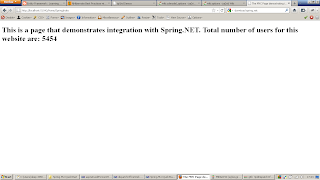
SpringIndex renders with UserCount value
The User count 5454 is coming from the AccountService which we successfully injected into the HomeController.

When the request for SpringIndex action of the HomeController comes to the server  following things occur
  • Spring intercepts the call and instantiates HomeController 
  • Injects all the dependencies of HomeController i.e. AccountService in our case
  • Calls the action method SpringIndex to complete the request
  • SpringIndex method calls the AccountService to get the UserCount and sets it in the ViewBag
  • SpringIndex.cshtml is rendered which shows UserCout!
We have successfully integrated Spring.NET with a MVC3 application!  That's all folks!
Have some Fun!