Showing posts with label mvc3 and web forms in one project. Show all posts

Saturday, August 6, 2011

Asp.Net MVC3 and Asp.Net Web Forms Side-By-Side in One Project - With Razor Views

In The previous post, I explained how we could use MVC3 and Asp.Net Web Forms Side-By-Side in One Project.  In that post, we were rendering MVC3 pages using the ASPX View Engine.  ASPX View Engine is the legacy view engine, Razor View Engine has significant advantages over the ASPX View Engine.  In this post we will see how we could use the Razor View Engine instead of the ASPX View Engine. 

The Asp.Net MVC 3 has always supported the concept of view engines – which are the pluggable modules that implement different template syntax options.  Razor view engine is optimized around HTML generation using a code-focused templating approach.

Why Razor View engine?

Razor View engine is build with the following design goals (read the detail design goals here)
  • Compact, Expressive, and Fluid: Razor minimizes the number of characters and keystrokes required in a file, and enables a fast, fluid coding workflow. Unlike most template syntax's, you do not need to interrupt your coding to explicitly denote server blocks within your HTML. The parser is smart enough to infer this from your code. This enables a really compact and expressive syntax which is clean, fast and fun to type.
  • Easy to Learn: Razor is easy to learn and enables you to quickly be productive. You use all your existing language and HTML skills.
  • Is not a new language: Razor enables developers to use their existing C#/VB (or other) language skills and deliver a template markup syntax that enables an awesome HTML construction workflow with language of our choice.
  • Works with any Text Editor: Razor doesn’t require a specific tool and enables you to be productive in any plain old text editor (notepad works great).  That said, I have to mention this, Resharper 6.0 has one of the best support for Razor Syntax.  Its a paid tool but its definitely worth the price.
  • Has great Intellisense: While Razor has been designed to not require a specific tool or code editor, it will have awesome statement completion support within Visual Studio.
  • Unit Testable: This is one of the most important Design Goal.  Razor implementation supports the ability to unit test views (without requiring a controller or web-server and can be hosted in any unit test project – no special app-domain required).
If you want to see a detailed reasoning of why Razor is better then ASPX View Engine, I strongly recommend vising this link

Now that we are convinced that, Razor View Engine is better than ASPX View Engine, lets integrate the Razor views in our Asp.Net Web Forms application with MVC3 integrated in it.

How Do they do it?

Initially, I though there must be setting somewhere in the project properties which will enable us to use the Razor View Engine, however, after several wasteful minutes of searching and researching in the project properties I found that, there is no such setting, we can directly go ahead and create the Razor view in the project.

Razor views have an extension of cshtml.  Lets create our first Razor view called RazorIndex.cshtml right next to the Index.aspx that we had created in the previous post.  This view will have nothing special, it will display one message that we set in the ViewBag.

Notice that we are displaying the UserName from the ViewBag.  Notice that, in the new Razor syntax, we have to use the @ sign to access any objects and properties.

Let's add one more method in our HomeController which will render the RazorIndex view and set the UserName in the ViewBag.  The controller code will look no different from how it looked for rendering ASPX pages.

This is a very good example of showing, how well the Seperation of Concerns Design Pattern has been implemented in MVC3.  Even though we want to use a different View Engine, controller code remains unchanged.  In fact, Controller has no idea about which View Engine will be used to render the view.  This is an excellent example of why things should be loosely coupled to achieve modular and clean code!

Before we can see if our Razor view is rendered correctly or not let's not forget to add one more route to our routes collection in Global.asax.cs file

We have just added one route called RazorHome. All set! Lets build the project and access the URL /home/razorindex and see whats the outcome.
First attempt to render Razor View results in an compilation error
OK does not look too good.  The error states that The type or namespace name 'Helpers' does not exist in the namespace 'System.Web'  To fix this we will have to do a change in the web.config.  We will need to add a few assemblies in the  <system.web><compilation> section.  The updated web.config would look like

After this lets build and access the URL /home/razorindex and les see what happens
Second attempt at rendering the Razor view also results in compilation error, this time it cribs for ViewBag
Still not quite there, but getting closer.  This time the error says that The name 'ViewBag' does not exist in the current context.  The problem is that the compiled class RazorIndex_cshtml is extending System.Web.WebPages.WebPage class.  As we had seen in the previous post, MVC views needs to extend from System.Web.Mvc.WebViewPage and not System.Web.WebPages.WebPage. 

How do we fix this issue?

We need to some how tell the framework that the Razor pages should extend System.Web.Mvc.WebViewPage class.  This is done by adding another web.config in the Views directory.  The project structure would now look like this
Project Structure with two web.config's
The content of this new web.config should look like

The element <pages pageBaseType="System.Web.Mvc.WebViewPage"> tells that, the Razor views will have base class of System.Web.Mvc.WebViewPage.

Lets Rebuild the app and browse the URL /home/razorindex and see what happens.
Success! Razor view renders correctly
Bingo!  We have an Asp.Net Web Forms application with MVC3 Razor views integrated in it!

PS: Now you have no reason to not move to ASP.NET MVC3 from Web Forms, we have proved that MVC3 can co-exist with a Web Forms in the same project!

Sunday, July 31, 2011

Asp.Net MVC3 and Asp.Net Web Forms Side-By-Side in One Project.

You must have known from my previous post that, we have moved to MVC3 instead of the Web Forms approach.

While I was suggesting the clients to adopt the new MVC3 framework, the obvious question from their side was, Can the Web Forms and MVC3 co-exist?  Can the new MVC code reside in the Web Forms project?

I Googled a little, found that it was very much possible, however we needed to spike it out to be completely sure.  After some trial and errors, we were able to make the Web Forms and MVC3 code co-exist in one project.  The entire process was not very straight forward hence, I decided to write a post on how to do it.

Let's first create a bare bone ASP.NET Web Forms application.  This can be done by using the Create New Project Wizard of the Visual Studio 2010

Create new Asp.Net Web Forms Project

The Wizard generates the web.config file, master page and two pages About.aspx and Default.aspx.  Running the app at this stage should open up a page like this

Asp.Net Web Forms Default Page

Now we have an asp.net web forms application up and running.  Lets try and add the MVC3 code in the existing project and lets get it running.  This would effectively prove that Web Forms and MVC3 can co-exist.

Integrating MVC3 into the Web Forms application - How Do They Do It!

MVC3 is build on Convention Over Configuration.  Controllers in MVC3 are put in a special directory called Controllers, the views go into the Views directory.  Lets create these two directories at the root level.

Adding Directories Controllers and View

Let's add a very simple controller class called HomeController to the project.  All MVC3 Controllers need to extend the System.Web.Mvc.Controller class.  To do this, you will need to add the reference of the System.Web.Mvc.dll into the project.

Lets look at the code that goes into the HomeController

The HomeController has a very simple Index Action method.  This Index action is simply going to render the Index view.  The Action method also adds a property to the ViewBag called UserName.  We will use the UserName Property in the view.

The Index view needs to be created.  Let's create a file called Index.aspx in the Views/Home/ directory.  The Index.aspx file looks like

Notice that, the aspx page inherits the class System.Web.Mvc.ViewPage and not System.Web.Page. All MVC3 views must extend the ViewPage class.

Also Notice, how we are showing the UserName from the ViewBag using the <%= %> Syntax.  Unlike traditional ASPX pages there is no code behind for this ASPX file.  

Curious thing about Index.aspx file is that, it does not inherit from the HomeController class.  Then how can the view access the ViewBag property UserName which was set in the Controller? 

Well, the MVC3 framework implements Separation of Concerns between the View and the Controller.  But it surely needs to pass information between the Controller and View, ViewBag is just one way of doing this.  Whatever we set in the ViewBag from the Controller is available in the Views!  This is just one of the way in which you can pass information between Controller and View.

The project structure at this stage looks like

Project Structure after adding the HomeController and Index.aspx page

At this stage, if we could open up the URL http://<host name>:<port>/<your application name>/home/index then we can be sure that we have successfully integrated MVC3 in a Web Forms Project.  Lets try and browse the URL and see what we get.

404 Error When we try to browse /home/index URL

We get a The resource cannot be found (404) error.  

Why?  

This is because, we have not yet informed the framework that, when someone hits the URL /home/index then how should it be served.  This can be done by registering a new route in the Global.ascx.cs file.

This file has an Application_Start method.  This method is called when the application is started.  In this method we have to inform the framework that, when someone sends a request for the URL /home/index then, route that URL to the HomeController.  This is done using the following code

The complete code of Global.ascx.cs file looks like

Lets run the application and browse the URL /home/index lets see what happens now?

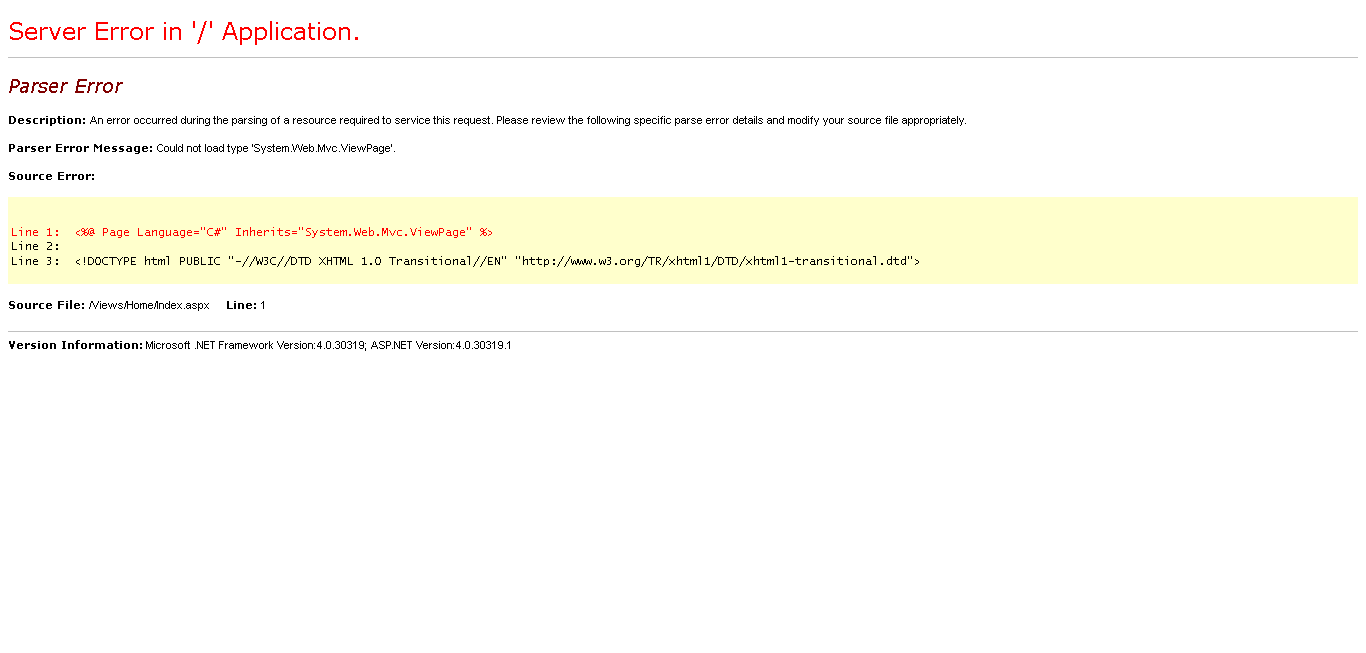
Parser Error - Could not load type 'System.Web.ViewPage'
Nope, not there yet.

Turns out that for the page to get compiled and render correctly we need to add the System.Web.Mvc in the system.web/compilation/assemblies section in the web.config. The updated web.config looks like 

The only change here was to add the assembly System.Web.Mvc to the list of assemblies under the compilation section. This will make sure that this assembly is available to the aspx view when its compiled.

After making this change lets run the app and browse the URL /home/index and lets see what happens.

Index.aspx is rendered Successfully using MVC3

Success!  We are able to render the page using MVC3 in a Web Forms application!

Notice that, currently we are using the aspx rendering engine for rending MVC3 views, in the next post I will explain how we could take advantage of the new Razor Rendering Engine in a Web Forms application.
Have some Fun!